One dashboard.
Every AI agent.
Tokens, cost, model, tools — recorded the same way whether you used Claude Code, Codex, OpenCode, or Copilot. Switch agents anytime; your cost data stays in one place.
| Field | Claude | Codex | OpenCode | Copilot |
|---|---|---|---|---|
| Provider / model | ✓ | ✓ | ✓ | ✓ |
| Input / output tokens | ✓ | ✓ | ✓ | ✓ |
| Cost in USD | ✓ | ✓ | ✓ | ✓ |
| Tools used | ✓ | · | ✓ | ✓ |
| MCP servers | ✓ | · | · | ✓ |
| Duration | ✓ | ✓ | ✓ | ✓ |
The Dashboard
Your work. Always accessible.
Browse daily context, notes, stats, and AI session cost. Keyboard-driven. Snappy.
Run worktale dash (or just worktale) to open it.
TODAY · Tuesday, March 4, 2025
Commits
7
Lines +
+1,204
Lines -
-389
Files
23
Time
4h 12m
🔥 STREAK ━━━━━━━━━━━━━━━━━━━━━ 14 days
📈 BEST ━━━━━━━━━━━━━━━━━━━━━━━━━━━━━━━━━ 31 days
THIS WEEK
Mon ████████████ 892 lines
Tue ███████████████████ 1,204 lines ← today
Wed ░░░░
Thu ░░░░
Fri ░░░░
RECENT COMMITS
• 2m ago fix: resolve auth token expiry edge case
• 47m ago feat: add retry logic to payment processor
• 2h ago refactor: extract email service into module
DAILY LOG · ← → to navigate days
◀ Monday, March 3, 2025 ▶
8 commits · +892 / -201 lines · 14 files touched
Your Notes
Spent the morning tracking down a race condition in the payment webhook handler. The root cause was a missing mutex around the idempotency key check. Classic.
[E to edit]
Commit Timeline
09:14 fix: webhook race condition (idempotency key)
10:02 fix: add mutex to payment handler
11:33 test: add race condition regression test
14:17 feat: implement retry backoff for failed webhooks
16:45 docs: update webhook integration guide
HISTORY · 2024 – 2025
Jan Feb Mar Apr May Jun Jul Aug Sep Oct Nov Dec
Mon ░▒▒▓█████▓▒░░░▒▒▓████████▓▒░▒▒▓███████▓░░▒▒▒▓█████▓▒
Wed ░▒▓████▓▒░░▒▒▓█████████▓▒░▒▒▓████████▒░░▒▒▓██████▓░░
Fri ▒▓███▓▒░░░▒▓███████████▓▒░▒▓█████████░░░▒▓███████▒░░
░ none ▒ light ▓ moderate █ heavy
ALL-TIME STATS
Total commits 4,847
Most active month August 2024
Lines written 892,044
Longest streak 31 days
Days active 287
Avg commits/day 4.2
TOP MODULES
src/api/ ████████████████████ 38%
src/ui/ ██████████░░░░░░░░░░ 21%
tests/ ████████░░░░░░░░░░░░ 18%
AI SESSIONS · last 30 days
Sessions
142
Cost
$47.83
Tokens
8.4M
Active
38h 12m
Cost/day
▁▃▂▅▄▇█▆▄▂▃▅▇▆▄▃▁▂▄▆█▇▅▃▂▁▃▅▄▂ peak $4.12
Tokens/day
▂▄▃▆▅██▇▅▃▄▆█▇▅▄▂▃▅▇██▇▆▄▂▃▄▃▂ peak 612k
AGENTS
claude-code 84 sessions
codex 32 sessions
opencode 17 sessions
copilot 9 sessions
MODELS
claude-opus-4-7 71x
gpt-5 28x
claude-sonnet-4-6 23x
gpt-5-codex 20x
PROVIDERS
anthropic 101 sessions
openai 32 sessions
github 9 sessions
TOP AGENT TOOLS
Read 1,248x
Edit 612x
Bash 489x
Grep 334x
Your dev story,
beautifully told.
Everything the CLI does—in a stunning desktop app. Glassmorphism UI, interactive heatmaps, CodeMirror digest editor, AI session tracking, and keyboard-first navigation. Built with Tauri + React for native performance.
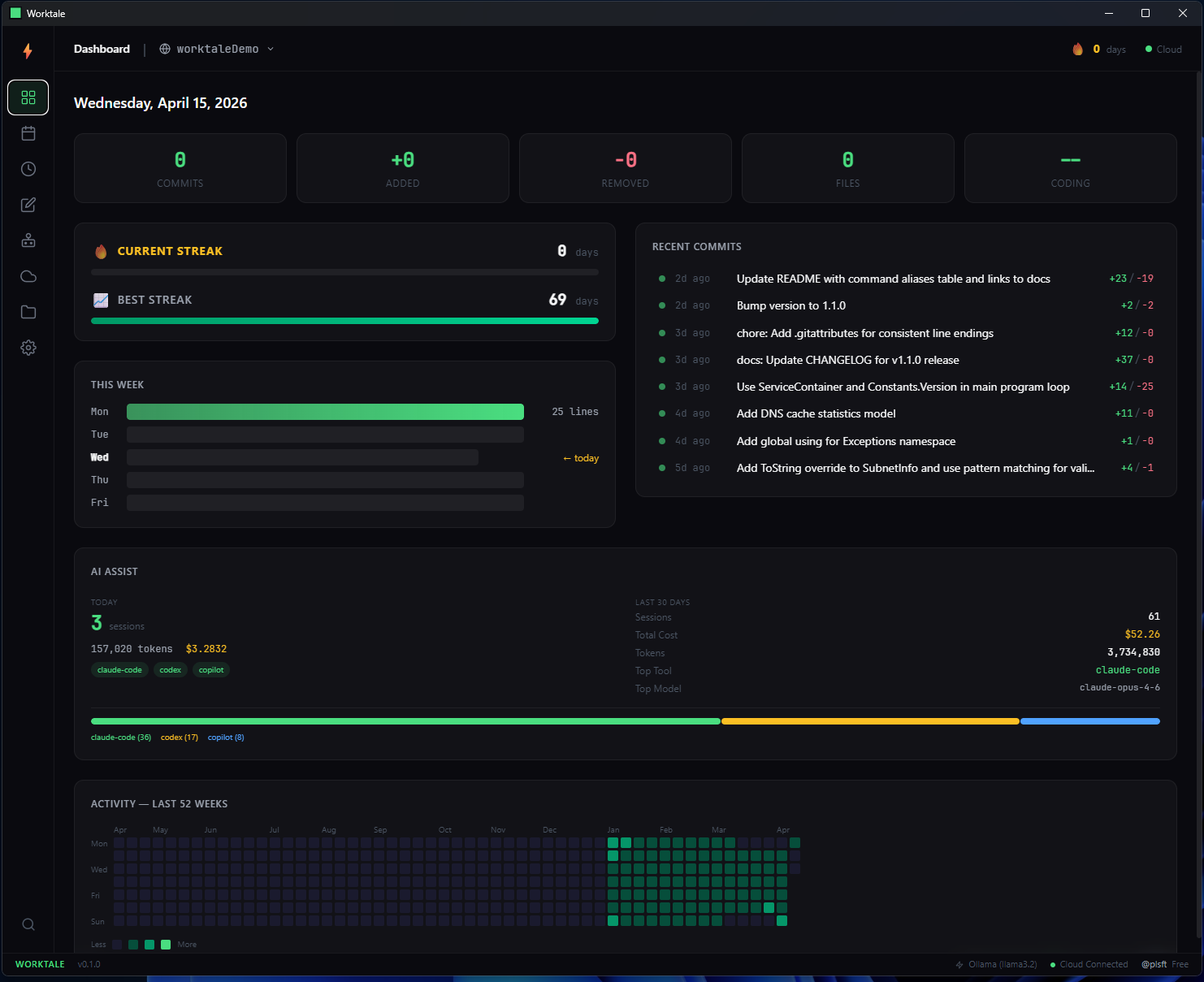
Dashboard — streaks, week chart, commit timeline, AI assist, and 52-week heatmap
Streak Tracking
Current and best streak visualized with animated progress bars. GitHub-style 52-week contribution heatmap with hover tooltips.
CodeMirror Digest Editor
Full markdown editor with syntax highlighting. Generate digests from commit history, edit, and publish to Worktale Cloud—all in one view.
Command Palette
Ctrl+K to access any action instantly. Keyboard shortcuts for every tab (Ctrl+1 through Ctrl+8). Built for speed.
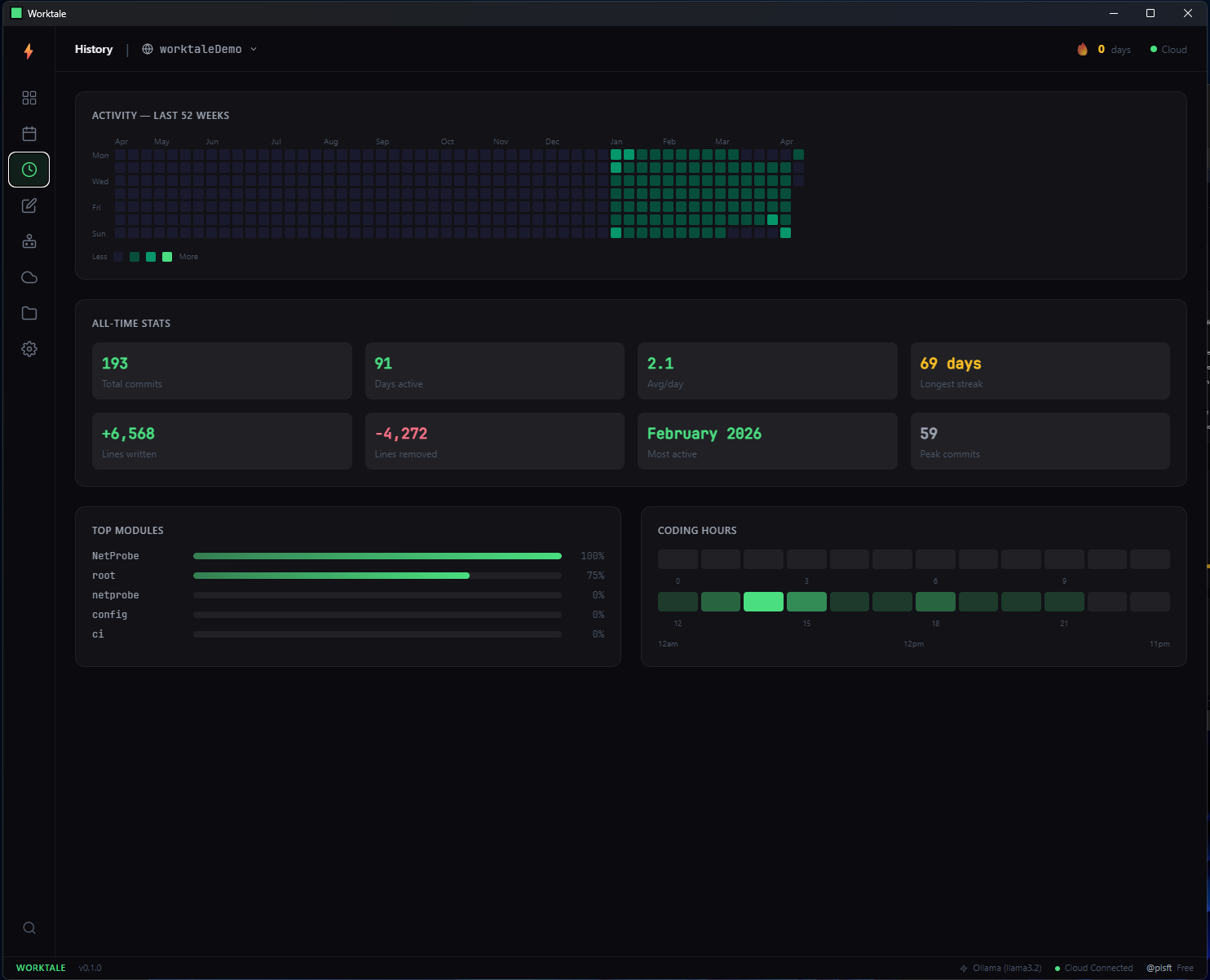
History — all-time stats, top modules, coding hours heatmap
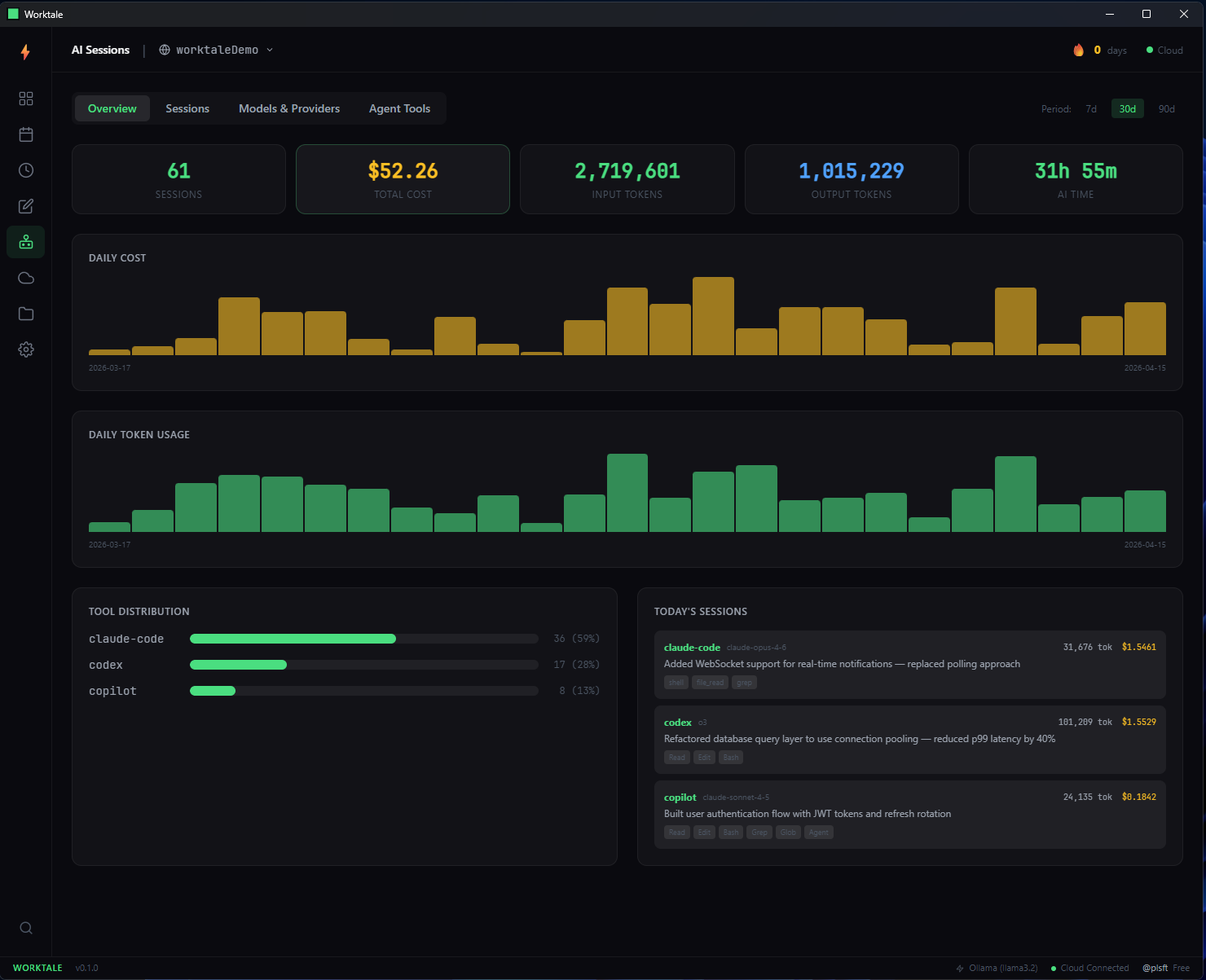
AI Sessions — cost tracking, token usage, tool distribution
8 Views
Dashboard, Log, History, Digest, AI, Cloud, Repos, Settings
100% CLI Parity
Every CLI feature, fully replicated in a native desktop experience
6.2 MB
Tauri + Rust backend. Native performance, tiny footprint
Cross-Platform
Windows, macOS, and Linux. Same experience everywhere
Download Worktale Desktop
Windows x64 v1.6.0 · 2.8 MB installerRequires the Worktale CLI to be installed. The desktop app reads the same local database.
Four agents.
One cost dashboard.
Every AI coding session captured automatically. Real tokens, real cost, real model attribution — written to your local database the moment a session ends. No agent cooperation needed.
See spend by project
Every session attributes to the repo it ran in. Know exactly what each client engagement is costing you in AI — pass it through, or factor it into your next rate.
Compare models, head to head
Is Opus actually worth 5× what Sonnet costs you on routine work? See real numbers per model. Stop guessing.
Switch agents anytime
Your data lives in one place regardless of which agent you used today. Browse in the desktop app, query from the CLI, sync to the cloud.
Local-first, private by default
All capture happens on your machine. No telemetry, no third-party data sharing. Cloud sync is opt-in.
$ worktale session stats --days 30
⚡ AI Usage — last 30 days
Sessions: 147 · Cost: $184.20 · Tokens: 12.4M
By agent:
claude-code 78 sessions $94.30 · 7.1M tokens
codex 41 sessions $58.40 · 3.8M tokens
opencode 19 sessions $22.10 · 1.2M tokens
copilot 9 sessions $9.40 · 348k tokens
By model (top):
claude-opus-4-7 56 sessions $78.20
gpt-5 32 sessions $48.10
sonnet-4-6 41 sessions $33.80
Switch repos with worktale repos to see per-project breakdowns — or open the desktop app for charts.
Your best work
shouldn’t disappear
when the job ends.
Most serious software gets built inside private repos. Under NDAs. Behind firewalls. At clients. At employers. When the engagement ends or you move on, the record doesn’t come with you — and six months later you can’t reconstruct what you shipped.
The same thing is happening with your AI spend. You’re burning real money on Claude, GPT, and Copilot, split across four different agents and however many projects, and the only record is your monthly invoice.
Worktale captures both — the work and the cost — on your machine, in a record that moves with you.
> six_months_from_now.txt
"What was that webhook race condition I fixed? And how much did the AI assist cost us on that project?"
You: “Let me dig through my memory…” (an hour later, still guessing)
> worktale log --days 180 --format json
“Oct 14, acme-portal: shipped the checkout flow, fixed 2 Stripe webhook race conditions. 6 commits. AI assist: $0.94 on Claude Opus. Commit shas, timestamps, context — all there.”
Six seconds, not six months.
How it works
Three commands. That's it.
npm install -g worktale
One command to install Worktale globally. Works on macOS, Linux, and Windows. No dependencies, no runtime needed.
$ npm install -g worktale
✓ worktale installed globally
worktale init
Run once per repo. Worktale scans your entire git history and builds your work record in seconds. Installs a silent post-commit hook.
$ cd my-project
$ worktale init
✓ 847 commits analyzed in 2.1s
worktale digest
End of day, Worktale compiles your work into a clean summary. Add your own notes. Build a log you'll actually want to read.
$ worktale digest
✓ Today's log saved locally.
Features
Everything you need to prove what you built.
A CLI that turns git metadata into a structured record of your engineering output.
Historical Analysis
Run
worktale init
and instantly discover years of hidden work.
Your longest streak, most productive month,
total lines shipped—all surfaced in
seconds.
Interactive TUI Dashboard
A rich terminal UI with three views: Overview (today's stats + streak), Daily Log (browse by day, add notes), and History (year-long heatmap + milestones).
Streaks & Heatmaps
See your consistency visualized. A GitHub-style contribution heatmap right in your terminal. Track current streaks, best streaks, and daily output patterns.
Daily Digest
Generate an end-of-day summary from your commits. Add personal notes about decisions, challenges, and wins. Build a work log you'll actually want to reference.
AI-Powered Narration
Use the
/worktale
Claude Code skill to auto-narrate commits. Or
use Ollama for local AI digests. Your data never
leaves the machine.
Requires v1.1.0+
Zero-Friction Capture
A silent
post-commit
hook captures every commit automatically. Or
use
batch
to import read-only—hooks are optional.
Multi-Repo Support
Track every repo you work on. Run
worktale repos
to see all your projects and their stats across
your entire machine.
End-of-Day Nudge
A gentle terminal reminder at 5 PM: "You shipped 1,204 lines today. Want to log it?" Never forget to capture a productive day.
Cross-Platform
Works on macOS, Linux, and Windows. Git Bash, PowerShell, WSL2—Worktale adapts. Dual hook strategy for seamless Windows support.
Use Cases
One record. Every kind of work.
A record that moves with you
Employer changes. Engagements end. Repos get archived. Your work shouldn’t evaporate with them. Worktale keeps a metadata-only record of what you built — one you own, one that follows you across jobs.
NDA-safe by default
Most serious software is under NDA. Worktale only reads git metadata — commit messages, timestamps, line counts. Never file contents, never diffs, never source. Your daily log is safe to share without breaking any agreement.
AI cost per project
Claude, GPT, and Copilot add up. If you’re billing clients, you need to know whether to pass the cost through. If you’re employed, you still need to know which projects are burning which tools — and for how much.
Status updates, auto-generated
Whether it’s a retainer client asking for a Friday recap, a manager asking “what did you ship?”, or a performance review prompt:
worktale digest assembles it from your commits, notes, and AI sessions. Paste and send.
Context, when you need it back
Six months into a long engagement, you’ll revisit code and not remember why. Worktale’s daily log has the AI session notes and decisions alongside the commits. Less archaeology, more building.
A living portfolio, if you want one
Opt in to Worktale Cloud and a public profile at worktale.dev/{username}
fills itself in as you work. For hiring managers, clients, or your own records. Every digest you publish is yours to toggle public or private.
Privacy First
Your code never
leaves your machine.
Worktale only reads git metadata—commit timestamps, messages, and diff stats. It never reads file contents, diffs, or source code. Ever.
Your SQLite database lives at
~/.worktale/data.db—outside any repo, never committed, never
synced (unless you opt in).
Now in Beta
Worktale Cloud
Everything stays local by default. But when you're ready to prove what you shipped, Worktale Cloud turns your local record into shareable, professional artifacts. Now live at worktale.dev.
Review & Promotion Packets
One-click export of your quarterly or annual output—ready to paste into any self-review or promotion doc.
Public Profile & Heatmap
worktale.dev/yourname — a portable engineering profile that includes private repo work.
Client & Consulting Summaries
Sanitized delivery reports for clients. Prove what you shipped without exposing code or internals.
Cross-Repo Timeline
All your repos in one unified stream—the full picture of your engineering output.
Weekly AI Digest & Email
AI rolls up your week into a polished summary—published or delivered to your inbox.
Standup & Retro Generator
“What did I do yesterday?”—answered instantly. Export for standups, retros, or status updates.
Free during beta. No credit card required.
FAQ
Common questions.
Yes. Run
worktale init
at the repo root and Worktale tracks all
commits across the entire monorepo. Each
commit is attributed to the files it touched,
so your digest reflects cross-package work
accurately.
Worktale reads from your local git
history—it never talks to a remote.
GitHub, GitLab, Bitbucket, Gitea, bare
repos—if
git log
works, Worktale works.
Absolutely. Worktale streams through git log output efficiently. Repos with 50k+ commits typically initialize in under 10 seconds. The older the repo, the deeper your record.
Never. Worktale only reads git metadata—commit hashes, timestamps, messages, and diff stats (lines added/removed). It never opens, reads, or stores any file contents.
The CLI is free and open source, forever. Worktale Cloud (shareable profiles, AI digests, cross-repo timelines) is now in beta at worktale.dev—free during beta, paid after.
Use
worktale batch
instead of
init. Batch imports your commit history
read-only—no hooks, no file changes,
nothing touches your repos. If you later
decide you want live tracking, run
worktale hook install
on specific repos. And
worktale hook uninstall
removes them cleanly. Full control, zero
commitment.
That's exactly what it's built for. Run
worktale digest
and you get exact dates, commit counts, repos touched,
and your own notes—everything you need to walk into
a review with receipts instead of vague recollections.
Your Worktale database lives at
~/.worktale/data.db—it's yours, on your machine, outside any repo.
When you lose access to a company's repos, your record
of what you shipped stays with you. That's the whole point.
No. Worktale is a personal tool that runs on your machine, stores data locally, and has no server component. There is no team dashboard, no manager view, no way for anyone else to see your data unless you explicitly choose to share it. You own your record.
Yes. Worktale only stores metadata—commit messages, timestamps, and line counts. No file contents, no diffs, no source code. Your digests show what you shipped and how much, never how. Safe to share in interviews, reviews, or with clients under NDA.
How Worktale Compares
Not another time tracker.
Most developer tools track keystrokes, require accounts, or send data to the cloud. Worktale is different—it reads your git history locally and builds a portable record of what you actually shipped.
| Feature | Worktale | WakaTime | ActivityWatch | git‑stats | git‑standup | RescueTime | GitClear |
|---|---|---|---|---|---|---|---|
| Local-first storage | ✓ | ✗ | ✓ | ✓ | ✓ | ✗ | ✗ |
| No account required | ✓ | ✗ | ✓ | ✓ | ✓ | ✗ | ✗ |
| Free & open source | ✓ | freemium | ✓ | ✓ | ✓ | freemium | paid |
| Tracks git commits | ✓ | ✗ | ✗ | ✓ | ✓ | ✗ | ✓ |
| Streaks & heatmaps | ✓ | ✓ | ✗ | ✓ | ✗ | ✗ | ✗ |
| Daily work summaries | ✓ | ✗ | ✗ | ✗ | basic | ✗ | ✗ |
| AI digest generation | ✓ | ✗ | ✗ | ✗ | ✗ | ✗ | ✗ |
| Interactive TUI dashboard | ✓ | web only | web only | ✗ | ✗ | web only | web only |
| No IDE plugin required | ✓ | ✗ | ✗ | ✓ | ✓ | ✗ | ✓ |
| Bulk import (batch mode) | ✓ | ✗ | ✗ | ✗ | ✗ | ✗ | ✗ |
| Works with any git host | ✓ | ✓ | n/a | ✓ | ✓ | n/a | ✗ |
WakaTime and RescueTime track active coding time via editor plugins or desktop agents. ActivityWatch monitors all computer usage. git‑stats provides terminal heatmaps. git‑standup shows yesterday’s commits. GitClear is an engineering analytics platform for teams. Worktale is the only tool that combines local git commit tracking, structured work records, daily digests, AI narration, and bulk repo import in a single privacy-first CLI.
Your best work is
worth remembering.
Stop guessing what you shipped last quarter.
Start building the record you deserve.
v1.5.0 · April 2026 · Requires Node.js 18+ · Free forever · Open source